
Kinsta is a managed WordPress hosting provider built for people who want a fast, secure, and professionally managed website without handling server maintenance themselves.
It is not a low cost shared hosting company like Hostinger, Bluehost, or SiteGround. Kinsta charges more because it includes a higher level of platform management, daily backups, Cloudflare security, CDN delivery, staging environments, performance monitoring, free migrations, and WordPress focused technical support.
For a new personal blog, Kinsta may feel expensive. For a business website, affiliate website, ecommerce store, agency project, or publisher that earns revenue from traffic, the price can make much more sense.
The real value is not only speed. It is the time and risk Kinsta removes from your work. You do not need to configure server caching, manage firewall rules, worry about daily backups, or troubleshoot every technical issue alone.
Still, Kinsta has limits. It does not include email hosting, it does not register domains, and its plans have storage, CDN, visitor, or bandwidth limits. This Kinsta review looks at pricing, features, performance, support, backups, security, WooCommerce hosting, and how Kinsta compares with other popular managed WordPress hosts.
Kinsta Overview

Kinsta is a strong choice for WordPress site owners who care about performance, security, reliable backups, and expert support.
It works best for businesses, agencies, publishers, ecommerce stores, membership websites, affiliate marketers, and growing content sites. It is less suitable for hobby blogs or people who only need a very cheap hosting account.
| Category | Kinsta Details |
|---|---|
| Best for | Businesses, agencies, publishers, stores, affiliate sites, and growing WordPress websites |
| Starting price | $35 per month or $350 annually |
| Best plan for one site | Single 20GB or Single 35k |
| Best plan for multiple sites | WP 2 |
| Hosting type | Managed WordPress hosting |
| Free migrations | Unlimited migrations included |
| Backups | Daily automatic backups and manual backups |
| Support | 24 hour expert chat support |
| CDN | Included with every plan |
| Security | Cloudflare firewall, DDoS protection, malware removal, SSL |
| Email hosting | Not included |
| Domain registration | Not included |
| Refund policy | 30 day money back guarantee |
Kinsta Pricing and Plans
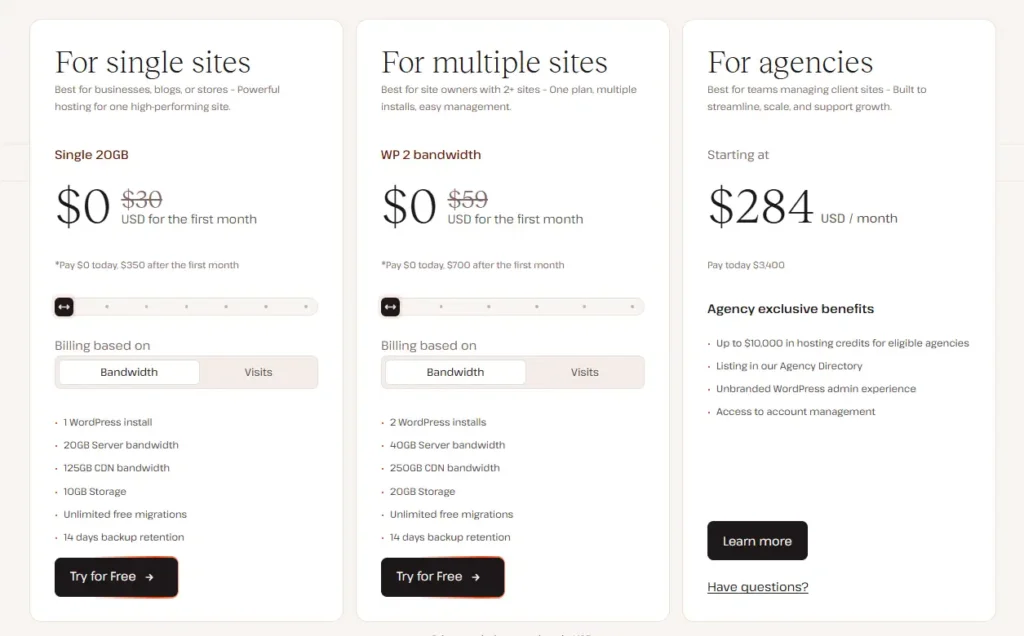
Kinsta changed its pricing model to give users more choice. You can choose a plan based on monthly visits or choose a plan based on server bandwidth.
This matters because some websites receive lots of bot traffic, image requests, or CDN traffic without generating a high number of real visitors. A bandwidth based plan may be easier to understand for publishers and businesses with unusual traffic patterns.
The table below shows the most relevant Kinsta plans for small and growing websites.
| Plan | Billing Method | Monthly Price | Annual Price | WordPress Sites | Main Resource Limit | Storage | CDN Bandwidth |
|---|---|---|---|---|---|---|---|
| Single 20GB | Server bandwidth | $35 per month | $350 annually | 1 | 20 GB server bandwidth | 10 GB | 125 GB |
| Single 35k | Monthly visits | $35 per month | $350 annually | 1 | 35,000 visits | 10 GB | 125 GB |
| Single 40GB | Server bandwidth | $50 per month | $500 annually | 1 | 40 GB server bandwidth | 10 GB | 250 GB |
| Single 65k | Monthly visits | $50 per month | $500 annually | 1 | 65,000 visits | 10 GB | 250 GB |
| Single 65GB | Server bandwidth | $90 per month | $900 annually | 1 | 65 GB server bandwidth | 10 GB | 500 GB |
| Single 125k | Monthly visits | $90 per month | $900 annually | 1 | 125,000 visits | 10 GB | 500 GB |
| WP 2 | Server bandwidth | $70 per month | $700 annually | 2 | 40 GB server bandwidth | 20 GB | 250 GB |
Kinsta offers a free first month on selected plans for new customers. Annual billing gives two months of savings compared with standard monthly billing.
The company also offers larger business, agency, and enterprise plans for users who need more WordPress installs, storage, bandwidth, CDN capacity, or visitor allowances.
Single 20GB Plan
The Single 20GB plan is Kinsta’s entry level bandwidth based option. It supports one WordPress website, includes 10 GB of storage, 20 GB of server bandwidth, and 125 GB of CDN bandwidth.
This plan is suitable for a professional blog, business website, small affiliate site, local service company, portfolio, or content website with moderate traffic.
The main benefit is that you are not charged based on visitor numbers. You monitor server bandwidth instead. This can work well for websites that have irregular traffic patterns or receive lots of automated requests.
Single 35k Plan
The Single 35k plan has the same monthly price as Single 20GB. It also supports one website, includes 10 GB storage, and gives 125 GB of CDN bandwidth.
The difference is that this plan uses monthly visits as the main allowance. It includes up to 35,000 visits each month.
This is useful for website owners who already understand their traffic through Google Analytics or another reporting tool. If your site receives predictable visitor numbers each month, the visit based plan is easy to manage.
However, visitor counts can be affected by automated traffic, crawlers, and other requests. A bandwidth plan may be better when your visitor data is unpredictable.
Single 40GB and Single 65k Plans
These plans cost $50 per month or $500 annually. They are aimed at growing websites that need more capacity.
Single 40GB includes 40 GB of server bandwidth, while Single 65k includes 65,000 monthly visits. Both plans include one WordPress site, 10 GB storage, and 250 GB of CDN bandwidth.
These plans are a good fit for an established affiliate website, a growing blog, a local business receiving steady leads, or a small WooCommerce store.
Kinsta lists these plans as suitable for ecommerce and membership websites. That makes sense because they offer more room for traffic and dynamic website activity.
WP 2 Plan
WP 2 is the best choice for users who need to host two WordPress websites. It costs $70 per month or $700 annually.
The plan includes two WordPress installs, 20 GB storage, 40 GB server bandwidth, and 250 GB CDN bandwidth.
This is useful for a business that manages a main website and a separate landing page website. It can also work well for an affiliate marketer running two profitable content sites or an agency managing a pair of client websites.
For users with more than two websites, Kinsta offers WP 5, WP 10, WP 20, and WP 40 plans.
Kinsta Features Explained
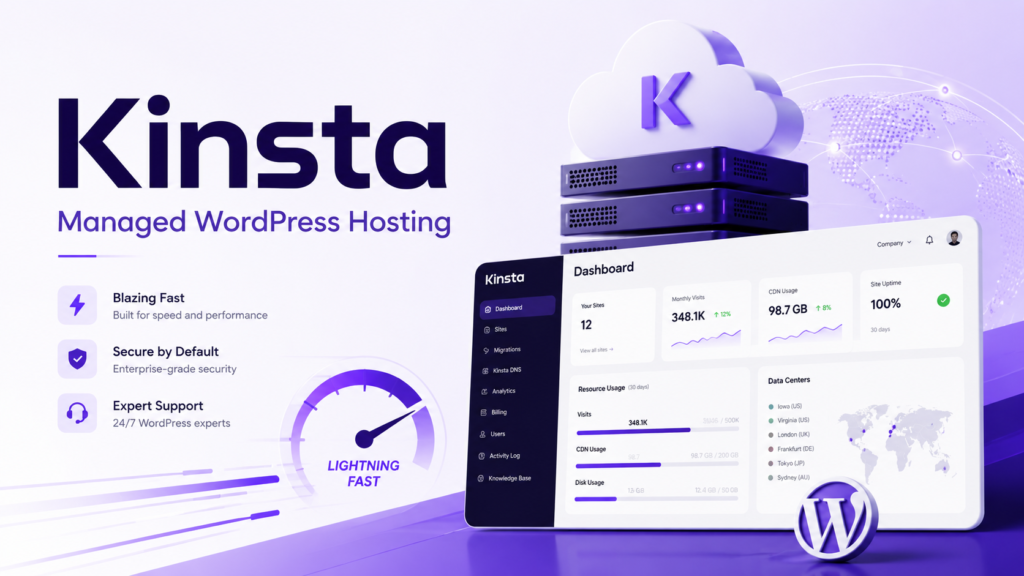
Kinsta includes many premium features with every managed WordPress plan. This is one reason its price is higher than a normal shared hosting account.
| Feature | Included With All Kinsta Plans |
|---|---|
| Managed WordPress hosting | Yes |
| Free SSL certificates | Yes |
| Cloudflare firewall | Yes |
| DDoS protection | Yes |
| CDN and edge caching | Yes |
| Daily backups | Yes |
| Manual backups | Yes |
| Free WordPress migrations | Yes |
| WordPress staging environment | Yes |
| SSH and SFTP access | Yes |
| Application performance monitoring | Yes |
| Malware removal | Yes |
| Unlimited user accounts | Yes |
| MyKinsta analytics | Yes |
| PHP version management | Yes |
| Search and replace tool | Yes |
Kinsta Performance and Speed
Kinsta is known for WordPress performance because it combines server level caching, CDN delivery, Cloudflare integration, isolated site environments, and performance tools.
Each website runs in its own isolated software container. This means one site is separated from other sites at the software level. It can reduce the risk of another customer’s traffic or poor website setup affecting your own website performance.
Kinsta also uses edge caching and CDN delivery. Cached versions of pages and site files can be delivered from locations closer to visitors. This is useful for websites with readers or customers in different countries.
For example, a website hosted for a United States audience may still receive visitors from India, the United Kingdom, Europe, Australia, or Canada. CDN delivery can help those visitors receive cached content faster.
Kinsta includes its own Application Performance Monitoring tool. This is useful for developers and experienced WordPress users because it can identify slow PHP processes, slow database queries, external requests, and plugin problems.
This is a major advantage over cheaper hosting providers. With normal shared hosting, a website may feel slow but you may not know why. Kinsta gives you a clearer way to identify the issue.
Still, hosting cannot fix every performance problem. A poor quality theme, oversized images, too many plugins, unnecessary scripts, excessive page builder settings, and slow third party tools can still hurt speed.
Kinsta Backups and Recovery
Backups are one of Kinsta’s strongest features. Every WordPress site receives automatic daily backups. You can also create manual backups before making an important change.
Manual backups are useful before you update plugins, change a theme, edit code, install WooCommerce features, or modify payment settings.
Kinsta also creates system generated backups during certain events. This gives you more recovery options if something goes wrong during a site change.
For businesses that update their sites constantly, Kinsta offers optional six hour and hourly backup add ons.
The six hour backup add on costs $20 per site per month. Hourly backups cost $100 per site per month.
Hourly backups are expensive, but they are designed for websites where data changes all day. Examples include ecommerce stores, membership sites, news websites, online communities, booking platforms, and websites with constant user activity.
Kinsta also offers external backup options for users who want copies sent to Amazon S3 or Google Cloud Storage.
Even with Kinsta’s backup tools, keeping an independent backup of important website data is still a smart habit. A backup system is most useful when you have more than one recovery option.
Kinsta Security Features
Kinsta includes security tools that are usually unavailable on budget shared hosting plans.
Every managed WordPress site receives Cloudflare firewall protection, DDoS protection, SSL certificates, malware removal, server level security patches, and vulnerability detection.
Kinsta scans WordPress plugins and themes for known security vulnerabilities. This helps website owners identify risky plugins before they become a larger issue.
The company also offers Kinsta Automatic Updates as an optional paid feature. This can update plugins and themes automatically while checking for problems. It includes a 31 day trial, then costs extra per environment.
Security does not mean you can ignore website maintenance. You still need strong passwords, trusted plugins, regular updates, limited administrator access, and careful use of third party themes.
Avoid downloading pirated plugins or themes. One unsafe plugin can create bigger problems than any hosting provider can prevent.
Kinsta Staging and Development Tools
Every Kinsta plan includes a free staging environment. A staging site is a private copy of your live website where you can test changes safely.
This is useful when you want to install a new plugin, redesign pages, change a theme, update WooCommerce, add custom code, or test a new page builder.
Instead of making changes directly on your live website, you can test everything in staging first. Once you are satisfied, you can push the changes to the live website.
Kinsta also supports SSH and SFTP access, which gives developers secure access to website files and server tools.
The MyKinsta dashboard makes common management tasks easier. You can clear cache, change PHP versions, turn on debugging, search and replace website text, manage redirects, review analytics, create backups, and add users from one dashboard.
For agencies, this is especially helpful. You can give clients, writers, developers, and managers different access levels without sharing one login.
Kinsta Migration Service
Kinsta includes free WordPress migrations on all plans. The migration team can move your website from your existing host to Kinsta.
The old website remains live while Kinsta creates and tests a copy on its platform. After testing is complete, you update the domain DNS records to make the Kinsta version live.
For standard WordPress sites, this process is simple. For ecommerce stores, membership websites, community websites, and sites with frequent transactions, you may need to use maintenance mode during the final migration period to prevent data loss.
This is a sensible precaution. Any website where orders, user registrations, comments, bookings, or payments happen regularly needs extra care during a migration.
Kinsta Support
Kinsta provides 24 hour technical support through chat. The support team focuses on WordPress hosting, backups, migrations, SSL, caching, PHP settings, platform tools, server errors, redirects, and staging environments.
There is no normal phone support option. This may be a negative for business owners who prefer speaking to someone directly during a technical issue.
For many users, expert chat support is enough because it allows support agents to share links, screenshots, logs, and technical instructions clearly.
Kinsta support can help identify WordPress problems, but it will not build custom website features, redesign your theme, or fix every problem caused by custom code. If the issue comes from a badly coded plugin or custom development work, you may still need your developer.
Kinsta Email and Domain Limitations
Kinsta does not include business email hosting. You need to use a separate service such as Google Workspace, Microsoft 365, Zoho Mail, or another email provider.
Kinsta supports transactional email from WordPress. This means your website can send order confirmations, password reset emails, form notifications, and account emails. However, it is not a full inbox service for sending and receiving normal business emails.
Kinsta also does not sell domain names. You need to buy your domain from a registrar and then connect it to your Kinsta website through DNS settings.
This setup may feel less convenient than Bluehost or Hostinger, where hosting, domain registration, and email can be managed in one account.
For established businesses, separate domain and email services can actually be better. It keeps your most important services independent from your hosting account.
Kinsta Pros and Cons
Kinsta Pros
• Strong managed WordPress hosting platform
• Fast performance with edge caching and CDN delivery
• Daily backups and manual backups included
• Free WordPress migrations on every plan
• Built in Application Performance Monitoring tool
• Strong Cloudflare security features
• Free malware removal through Kinsta’s security pledge
• Staging environment included on every plan
• Expert WordPress support available all day through chat
• Useful plans for both one site and multiple site owners
• Flexible choice between visit based and bandwidth based pricing
Kinsta Cons
• More expensive than shared hosting providers
• No email hosting included
• No domain registration included
• No phone support
• Storage limits may be restrictive for large media heavy websites
• Visitor, server bandwidth, CDN bandwidth, and storage limits apply
• Hourly backups and Redis caching cost extra
• Some beginners may not need its advanced platform tools
Kinsta vs WP Engine vs SiteGround
Kinsta, WP Engine, and SiteGround are all strong WordPress hosting options, but they serve different types of users.
| Provider | Entry Plan | Starting Price | Website Limit | Backups | Staging | Support | Best For |
|---|---|---|---|---|---|---|---|
| Kinsta | Single 20GB or Single 35k | $35 per month | 1 | Daily and manual | Yes | 24 hour chat | Businesses and high value WordPress websites |
| WP Engine | Startup | $30 per month | 1 | Daily and manual | Yes | Chat support | Businesses needing managed WordPress tools |
| SiteGround | GrowBig | $4.99 per month first term | Unlimited | Daily and on demand | Yes | Chat, phone, tickets | Users who want lower introductory pricing |
| Hostinger | Business | $3.99 per month first term | Up to 50 | Daily and on demand | Yes | Online support | Budget focused site owners |
Kinsta is the better fit when you want premium managed WordPress hosting with strong technical tools, free migrations, Cloudflare security, and a platform built around speed.
WP Engine is a close competitor. It is also a premium managed WordPress host and may suit businesses that prefer its ecosystem and plan structure.
SiteGround and Hostinger are much cheaper at the beginning. They are good choices for users who do not need a premium managed platform yet. However, they require more responsibility from the website owner when dealing with performance, plugins, optimization, and technical maintenance.
Who Should Choose Kinsta?
Kinsta is a good choice for affiliate marketers who earn meaningful revenue from their websites. Faster performance, reliable backups, security support, and staging tools can protect a site that produces leads or commissions.
It is also a strong option for ecommerce stores. WooCommerce websites often need reliable backups, caching, security, and a safe place to test updates before making changes live.
Agencies can benefit from Kinsta because they can manage client websites, create staging environments, control user access, migrate sites, and monitor performance from one dashboard.
Publishers and content websites may also find Kinsta useful when traffic increases. The ability to choose a visit based or bandwidth based plan gives more flexibility than a simple shared hosting account.
Who Should Avoid Kinsta?
Kinsta is not the right choice for every website.
A new blogger with no traffic may not need to spend $35 per month. Hostinger, Bluehost, SiteGround, or another lower cost host can be enough while learning WordPress and building initial traffic.
You may also want a different provider if you need free business email, free domain registration, phone support, unlimited storage, or very low monthly costs.
Kinsta is also designed around WordPress. It is not the ideal choice if you need to host several different types of web applications from one traditional shared hosting account.
Kinsta Review FAQs
1. Is Kinsta good for WordPress?
Yes. Kinsta is one of the stronger managed WordPress hosting providers because it includes daily backups, staging, free migrations, caching, CDN delivery, Cloudflare security, malware removal, and expert WordPress support.
2. Does Kinsta offer a free domain?
No. Kinsta does not include domain registration. You need to purchase a domain through a separate registrar and connect it through DNS settings.
3. Does Kinsta include email hosting?
No. Kinsta does not provide full email inbox hosting. You need a separate email provider for business email addresses.
4. Does Kinsta have a money back guarantee?
Yes. Kinsta provides a 30 day money back guarantee for eligible managed WordPress plans and add ons, subject to its refund terms.
5. What happens if I exceed my Kinsta plan limits?
Your website remains online, but Kinsta charges overage fees. Visit based plans charge $0.50 per 1,000 additional visits. Bandwidth based plans charge $0.50 for every additional GB of server bandwidth.
6. Is Kinsta worth the price?
Kinsta is worth the price when your website produces revenue, leads, sales, commissions, or client value. The platform reduces the work involved in managing WordPress hosting and gives you better protection when something goes wrong.
Is Kinsta Worth It?
Kinsta is one of the best managed WordPress hosting providers for businesses that need more than basic hosting.
It is expensive compared with shared hosting, but the price includes useful features such as free migrations, daily backups, staging, CDN delivery, security protection, malware removal, performance monitoring, and expert support.
The Single 20GB or Single 35k plan is a good place to start for one serious website. The best choice depends on whether you prefer to manage your plan based on server bandwidth or monthly visitor numbers.
For a small hobby blog, Kinsta may be too expensive. For a business, affiliate site, ecommerce store, agency, or publisher where downtime and slow loading pages can cost money, Kinsta can be a smart long term investment.