
DreamHost is one of the longer running web hosting companies in the market. It is known for WordPress hosting, simple website tools, daily backups, transparent renewal pricing, and a setup that works well for bloggers, small businesses, freelancers, and website owners managing several projects.
The company recently refreshed its standard shared hosting plans. Instead of the older Shared Starter and Shared Unlimited plans, DreamHost now offers Web Hosting Launch, Growth, and Scale. These plans come with defined website, storage, email, and database limits, which makes it easier to understand what you are buying before checkout.
DreamHost is not trying to be the cheapest host at every stage. Hostinger may cost less on a long prepaid term, and premium providers such as Kinsta offer a more hands off WordPress experience.
DreamHost sits in the middle. It gives you affordable web hosting, useful WordPress features, daily automated backups, solid resources, and an upgrade path to DreamPress or VPS hosting when your website outgrows shared hosting.
The biggest thing to understand is the email policy. New Web Hosting plans include email free for the first three months. After that, paid email is added if you want to keep the mailboxes active.
This is not a deal breaker, but it is an expense you should calculate before buying.
This DreamHost review looks closely at pricing, performance, WordPress tools, backups, security, email, support, and whether DreamHost is the right host for your website.
DreamHost Overview
DreamHost is a good choice for people who want more than a basic one website hosting plan without moving to expensive managed WordPress hosting.
The Growth plan is the best fit for most users. It supports up to 50 websites, includes 50 GB NVMe storage, is designed for about 200,000 monthly visits, includes daily backups, and has enough room for content sites, business websites, affiliate projects, and smaller WooCommerce stores.
| Category | DreamHost Details |
|---|---|
| Best for | Bloggers, small businesses, affiliate sites, freelancers, agencies, and WordPress users |
| Starting price | $1.99 per month on a four year term |
| Best value plan | Web Hosting Growth |
| Website limit | 25 on Launch, 50 on Growth, 100 on Scale |
| Storage | 25 GB to 100 GB NVMe SSD storage |
| Traffic allowance | Unmetered bandwidth with published monthly visitor guidance |
| Free domain | Included for the first year on annual and longer terms |
| Backups | Daily automated backups |
| SSL | Unlimited free SSL certificates |
| Free for first three months, then paid add on | |
| Support | 24 hour chat and support requests |
| Refund policy | 30 day money back guarantee for Web Hosting |
DreamHost Pricing and Plans
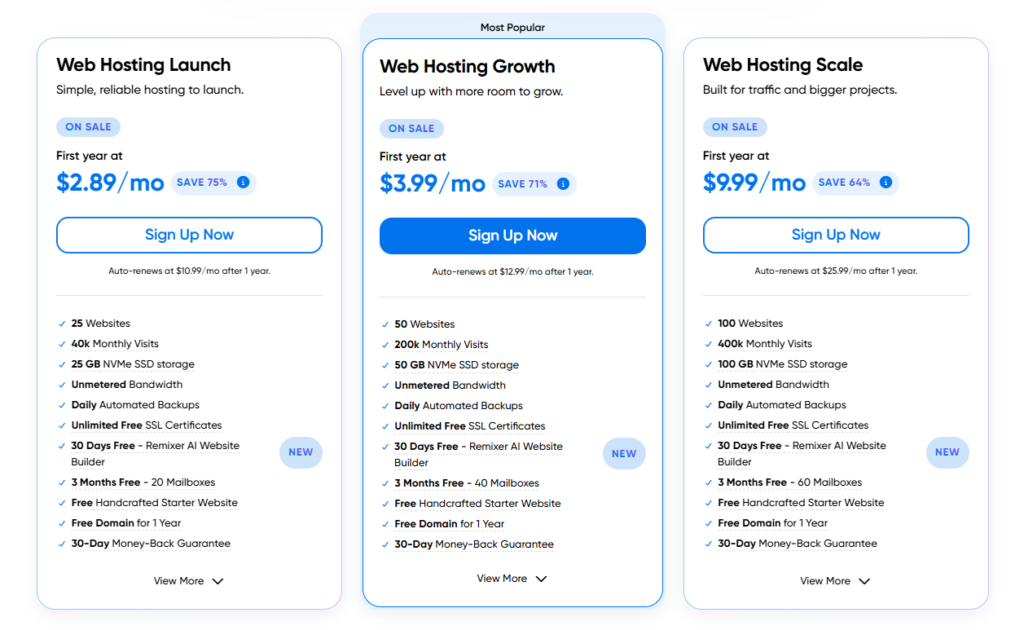
DreamHost offers four billing choices for Web Hosting: monthly, yearly, two year, and four year terms. The lowest advertised rates require a four year commitment paid in advance.
The annual prices are easier for many buyers to understand because the total is lower upfront. The four year prices offer the best monthly rate, but you pay the whole term at checkout.
| Plan | First Year Price | First Year Total | Renewal After One Year | Four Year Intro Price | Four Year Total | Renewal After Four Years |
|---|---|---|---|---|---|---|
| Web Hosting Launch | $2.89 per month | $34.68 | $10.99 per month | $1.99 per month | $95.52 | $7.99 per month |
| Web Hosting Growth | $3.99 per month | $47.88 | $12.99 per month | $3.49 per month | $167.52 | $8.99 per month |
| Web Hosting Scale | $9.99 per month | $119.88 | $25.99 per month | $7.99 per month | $383.52 | $19.99 per month |
Taxes are added at checkout. The listed promotional price applies to the first term only. Renewal rates are clearly shown before checkout, which is a positive point because many hosts make long term pricing harder to understand.
DreamHost Web Hosting Launch
Web Hosting Launch is the entry level plan. It supports up to 25 websites, includes 25 GB NVMe storage, 25 databases, 25 subdomains, and is designed for around 40,000 monthly visits.
That is a generous website allowance for a starter plan. Most hosts at this price level only allow one to three websites. However, the storage limit is shared across every site in the account. Hosting 25 websites is technically possible, but image heavy websites, large WordPress backups, or several WooCommerce stores can use 25 GB quickly.
Launch is best for a small blog, portfolio, local business site, landing page collection, or a few lightweight WordPress projects. It is not the ideal plan for active ecommerce stores or agencies managing client websites.
The plan includes 20 email mailboxes free for the first three months. After that, paid email applies if you keep the service active.
DreamHost Web Hosting Growth
Growth is the plan most users should choose. It includes up to 50 websites, 50 GB NVMe storage, 50 databases, 50 subdomains, and guidance for around 200,000 monthly visits.
This plan makes more sense for affiliate marketers, bloggers, small agencies, businesses with multiple web properties, and people building several WordPress websites over time.
The storage increase from 25 GB to 50 GB gives you more room for WordPress files, media libraries, plugins, databases, and multiple sites. It also includes 40 mailboxes free for the first three months.
Growth and Scale plans also include one monthly DreamShield malware scan per website. It is useful as a basic safety check, although it is not the same as continuous malware protection.
For most publishers and small businesses, Growth gives the best balance between pricing, capacity, and long term room to expand.
DreamHost Web Hosting Scale
Web Hosting Scale is for bigger projects. It supports up to 100 websites, 100 GB NVMe storage, 300 databases, 300 subdomains, and published guidance for around 400,000 monthly visits.
This plan can suit agencies, publishers with several established sites, large content portfolios, or businesses that need more storage and resources without moving to VPS hosting immediately.
Scale is not automatically the best option just because it has the largest limits. A small business site will not benefit from the added capacity. Growth is usually a better value unless you already manage a large number of websites or expect higher traffic.
The plan includes 60 mailboxes free for the first three months.
DreamHost Features Compared
| Feature | Launch | Growth | Scale |
|---|---|---|---|
| Websites | 25 | 50 | 100 |
| NVMe storage | 25 GB | 50 GB | 100 GB |
| Suggested monthly visits | 40,000 | 200,000 | 400,000 |
| MySQL databases | 25 | 50 | 300 |
| Subdomains | 25 | 50 | 300 |
| Free email for first three months | 20 mailboxes | 40 mailboxes | 60 mailboxes |
| Daily automated backups | Yes | Yes | Yes |
| Free SSL certificates | Yes | Yes | Yes |
| Free domain for first year | Yes on annual and longer terms | Yes on annual and longer terms | Yes on annual and longer terms |
| Free WordPress migration tool | Yes | Yes | Yes |
| Automatic WordPress updates | Yes | Yes | Yes |
| Monthly DreamShield scan | No | Yes | Yes |
| Free starter website setup | Yes | Yes | Yes |
DreamHost WordPress Hosting Experience
DreamHost works well for WordPress users. You can install WordPress through its own control panel, create databases, manage files, add SSL certificates, connect domains, create email accounts, and handle basic site settings in one place.
DreamHost does not use cPanel. It uses a custom panel that is simpler than cPanel for beginners, although experienced hosting users may need a little time to get used to the layout.
The WordPress setup process is straightforward. You can install WordPress, connect your domain, choose a theme, and begin publishing quickly. DreamHost also includes automatic WordPress core and security updates, which reduces some routine maintenance work.
There is a WordPress migration plugin for moving an existing site. This is useful for bloggers or businesses moving away from another shared host. You can copy your website to DreamHost, test it, and then update your domain DNS when the new version is ready.
A useful extra is the free handcrafted starter website. DreamHost says this includes basic setup, content placement, and template customization. It is not a custom website built from scratch, but it can help a new business get a basic site online faster.
Performance and Speed
DreamHost uses NVMe SSD storage across its current Web Hosting plans. NVMe storage is faster than older SATA based storage and helps with file access, WordPress database activity, and general server responsiveness.
Every plan includes unmetered bandwidth. That does not mean every site can use unlimited server resources. Shared hosting always has practical CPU, memory, and resource limits to keep one account from affecting other customers on the server.
The published visitor figures are helpful as rough guidance. Launch is aimed at about 40,000 monthly visits, Growth at 200,000, and Scale at 400,000. These figures are not a guarantee that any site will handle that exact traffic level because performance also depends on plugins, images, theme quality, cache settings, database size, and how dynamic the website is.
A basic WordPress blog with optimized images can handle more traffic than a WooCommerce store with logged in users, product filters, cart activity, and many plugins.
DreamHost includes a traffic dashboard and error log tools within its platform. These tools are useful because they help website owners understand where traffic is coming from and identify technical errors without installing multiple third party monitoring tools.
One important limitation is the CDN. DreamHost promotes Bunny CDN as an add on, not a feature included in standard Web Hosting. Bunny CDN starts at $9.95 per month. A CDN can help improve loading times for global audiences, especially sites with many images or visitors far from the main server location.
Daily Backups and Restore Options
DreamHost includes daily automated backups on Launch, Growth, and Scale. This is a strong feature because many budget hosts only offer weekly backups on entry plans.
Daily backups can help when a plugin update breaks your site, a page is deleted accidentally, a theme change goes wrong, or website files are damaged.
Still, never rely on a hosting company as your only backup solution. Keep an external copy of your files and database through a WordPress backup plugin, cloud storage account, or local download.
This is especially important for affiliate websites, ecommerce stores, lead generation pages, and business sites that change regularly. A separate backup gives you more control if your account is closed, suspended, or experiences a technical issue.
DreamHost does not include one click staging on standard Web Hosting plans. Staging is available through DreamPress managed WordPress hosting. This matters if you frequently test new themes, plugins, checkout changes, or custom code.
Security Features
Every DreamHost Web Hosting plan includes free SSL certificates. SSL is essential because it encrypts data between your website and visitors. It also helps browsers treat your website as secure and is necessary for checkout pages, forms, user accounts, and business websites.
Growth and Scale plans include one free monthly DreamShield malware scan for each website. DreamShield checks for malware, insecure file permissions, suspicious login activity, SSL problems, and Google Safe Browsing warnings.
The full DreamShield service is optional and costs $3 per website per month. It adds daily malware scans, alerts, reports, and additional automated protection.
This is useful, but security is still your responsibility too. Use strong passwords, remove unused plugins, keep WordPress updated, limit administrator access, avoid pirated themes, and enable two factor authentication wherever possible.
DreamHost advertises a 100 percent uptime guarantee. However, the guarantee is a service credit rather than cash compensation, and the company requires users to report a qualifying outage through support. It is a positive policy, but it should not be confused with a promise that downtime can never happen.
Email Hosting and Domain Features
DreamHost gives every Web Hosting customer professional email free for the first three months. After that, the paid email plan starts at $1.99 per mailbox per month or $1.67 per mailbox per month when paid annually.
Each paid mailbox includes up to 25 GB of storage. The key point is that email is not permanently included with the new Web Hosting plans. This can add up for a business with several staff accounts.
For example, a company using ten mailboxes would pay about $19.90 per month on monthly billing after the free period. Businesses already using Google Workspace or Microsoft 365 may not care about this. Small businesses looking for bundled email should calculate it before choosing DreamHost.
Annual and longer Web Hosting terms include a free domain for the first year. Domain registration is nonrefundable, even if you cancel your hosting within the refund period. Check your domain renewal cost before purchase because that charge is separate from hosting renewal.
Support and Ease of Use
DreamHost provides support around the clock through chat and support requests inside the customer panel. It also has an extensive knowledge base for WordPress, domains, email, SSL, databases, DNS, and website migration.
The main limitation is phone support. Standard Web Hosting users should expect chat and email style support rather than a normal phone help line. This may not matter for users who are comfortable following written instructions. It can be frustrating for someone who prefers to speak directly with a technician during a technical issue.
DreamHost’s control panel is beginner friendly once you learn it. The account area keeps domains, WordPress installations, files, databases, email, billing, backups, and security settings under one dashboard.
DreamPress Managed WordPress Hosting
DreamPress is DreamHost’s managed WordPress hosting service. It is a better choice for users who need staging, managed performance tools, WordPress specialist support, CDN access, failover protection, and stronger recovery options.
DreamPress 1 starts at $14.99 per month for the first year and renews at $19.99 per month. It supports one website, includes 15 GB NVMe storage, is designed for about 40,000 monthly visitors, includes a professional site migration, unlimited mailboxes, staging, CDN access, and WordPress expert support.
DreamPress makes more sense than standard Web Hosting when your website produces meaningful income through affiliate commissions, product sales, leads, memberships, advertising, or client work.
For a new blog or basic business website, Web Hosting Growth is usually enough. For a busy WooCommerce store, membership site, or high value publisher site, DreamPress can be a better long term option.
DreamHost Pros and Cons
DreamHost Pros
• Affordable first term pricing on annual and four year plans
• Clear website, storage, database, and email limits
• Daily automated backups included on every Web Hosting plan
• Up to 25 websites even on the entry level Launch plan
• NVMe storage included across the lineup
• Free domain for the first year on annual and longer terms
• Free SSL certificates included
• WordPress installation, migration tool, and automatic updates included
• Growth plan offers strong value for multiple websites
• Free starter website setup is useful for beginners
• 30 day money back guarantee on Web Hosting
DreamHost Cons
• Email is only free for the first three months
• CDN is not included with standard Web Hosting
• No included WordPress staging on Web Hosting plans
• Standard support does not include normal phone help
• The best advertised rates require four years of prepaid hosting
• DreamShield daily malware protection costs extra
• Shared hosting may not be enough for large WooCommerce stores or heavy traffic sites
DreamHost vs Hostinger vs Bluehost vs SiteGround
| Provider | Comparable Plan | Introductory Price | Renewal Price | Websites | Storage | Backups | Best For |
|---|---|---|---|---|---|---|---|
| DreamHost | Growth | $3.99 per month for first year | $12.99 per month | 50 | 50 GB NVMe | Daily | Multi site users who want daily backups and transparent renewal pricing |
| Hostinger | Business | $3.99 per month on a 48 month term | $16.99 per month | 50 | 50 GB NVMe | Daily and on demand | Budget focused WordPress users |
| Bluehost | Business | $6.99 per month on a 36 month term | $13.99 per month | 50 | 50 GB NVMe | Weekly | Beginners wanting phone support and bundled security tools |
| SiteGround | GrowBig | $4.99 per month on a 12 month term | $29.99 per month | Unlimited | 50 GB | Daily and on demand | Users who need staging, caching, and hands on support |
DreamHost Growth is one of the better choices for people who need daily backups and want to host many websites without paying SiteGround’s higher renewal price.
Hostinger Business is usually better for users who want on demand backups, a free CDN, and lower entry pricing on a long contract.
Bluehost Business is better for people who want phone support, weekly backups, security tools, and a more traditional WordPress hosting experience.
SiteGround GrowBig is stronger for staging, caching, and advanced WordPress workflows. However, its renewal cost is much higher than DreamHost Growth.
Who Should Choose DreamHost?
DreamHost is a good fit for bloggers who want to run more than one website without paying for a separate hosting plan each time.
It is also useful for affiliate marketers managing review sites, comparison sites, niche blogs, and smaller content projects. Growth can provide enough capacity for several sites as long as you monitor storage and keep websites optimized.
Small businesses can use DreamHost for service websites, local lead generation pages, blogs, and basic WooCommerce stores. The free domain, SSL, WordPress tools, daily backups, and basic starter site service help reduce setup work.
Freelancers and agencies can also use Growth or Scale to manage client websites. Agencies with more demanding client sites may eventually need DreamPress or VPS hosting for better isolation and performance.
Who Should Avoid DreamHost?
DreamHost may not be the best fit for a user who wants email permanently included in the hosting price. The three month email trial is useful, but larger businesses may prefer a host that bundles mailboxes or may choose Google Workspace or Microsoft 365 separately.
It is also not ideal for people who need staging on a shared hosting plan. DreamPress offers staging, but that comes at a higher price.
Large ecommerce stores, membership platforms, high traffic publishers, and complex applications may outgrow shared hosting. In those cases, DreamPress, Cloudways, Kinsta, WP Engine, or a VPS may be a better option.
DreamHost Review FAQs
Is DreamHost good for WordPress?
Yes. DreamHost is a good WordPress host for beginners and growing site owners. It includes WordPress installation, automatic updates, daily backups, free SSL, a migration plugin, and plans that support multiple websites.
Does DreamHost include free email?
Email is free for the first three months on current Web Hosting plans. After that, paid email starts at $1.99 per mailbox per month or $1.67 per mailbox per month on annual billing.
Does DreamHost include a free domain?
Yes. DreamHost includes a free domain for the first year when you choose an annual, two year, or four year Web Hosting plan. Domain renewal is charged separately after the first year.
Is DreamHost Growth worth it?
Yes. Growth is the best option for most users because it includes 50 websites, 50 GB NVMe storage, daily backups, 50 databases, and published capacity for around 200,000 monthly visitors.
Does DreamHost offer daily backups?
Yes. Launch, Growth, and Scale include daily automated backups. Important websites should still keep an independent external backup.
Is DreamHost good for ecommerce?
DreamHost can work for a small WooCommerce store. Larger stores, membership sites, booking platforms, and websites with frequent orders should consider DreamPress or VPS hosting for more dedicated resources and stronger managed features.
Is DreamHost Worth It?
DreamHost is worth considering for people who want reliable shared hosting with daily backups, WordPress tools, clear resource limits, and lower renewal prices than several premium shared hosts.
The Growth plan is the best choice for most users. It provides enough websites and storage for bloggers, affiliate publishers, freelancers, and small businesses without pushing the price too high.
The main drawbacks are email pricing after three months, no included CDN, and no staging on standard Web Hosting. These are manageable limitations for many users, but they matter for businesses that need advanced WordPress tools.
For a new or growing WordPress website, DreamHost offers strong value. It is especially appealing when you want daily backups, multiple sites, and a predictable path to more powerful hosting later.