
Cloudways is different from normal web hosting companies. Instead of selling one fixed shared hosting package, it gives you a managed layer on top of cloud infrastructure from providers such as DigitalOcean, Vultr, Linode, Amazon Web Services, and Google Cloud.
This model gives you more control over speed, resources, server location, and scalability than basic shared hosting. At the same time, Cloudways handles many of the technical tasks that make direct cloud hosting difficult for beginners. You can launch WordPress, WooCommerce, Magento, Laravel, and other PHP based applications without setting up a server from scratch.
That makes Cloudways attractive for affiliate websites, agencies, growing businesses, WooCommerce stores, publishers, and developers who need more than a cheap shared hosting account. It is also useful for people who want dedicated server resources but do not want to manage Linux commands, security patches, web server settings, caching layers, and server monitoring on their own.
However, Cloudways is not the simplest choice for every beginner. It does not include a free domain, standard email inboxes, or a typical cPanel account. Its pricing also depends on the cloud provider, server size, backup storage, and any add ons you choose.
This Cloudways review explains its plans, pricing, performance tools, security, backups, support, ecommerce features, pros and cons, and whether it is the right host for your website.
Cloudways Review at a Glance
Cloudways is a strong choice for people who want managed cloud hosting with more flexibility than normal WordPress hosting.
The best starting point for many website owners is Cloudways Flexible with a DigitalOcean server. The entry plan starts at $11 per month and includes 2 GB RAM, one vCPU, 50 GB storage, and 2 TB transfer bandwidth. You can host multiple applications on the same server, as long as your server resources can handle them.
| Category | Cloudways Details |
|---|---|
| Best for | Affiliate sites, agencies, WooCommerce stores, growing businesses, publishers, developers |
| Hosting type | Managed cloud hosting |
| Starting price | $11 per month on DigitalOcean |
| Billing model | Hourly and monthly pay as you go billing |
| Best value option | Cloudways Flexible with DigitalOcean |
| Cloud providers | DigitalOcean, Vultr, Linode, AWS, Google Cloud |
| Website limit | Multiple applications on one server, subject to resources |
| Free SSL | Yes |
| Backups | Automated and on demand backups |
| CDN | Cloudflare Enterprise add on available from $4.99 per domain monthly |
| Available as a paid Rackspace email add on | |
| Support | 24 hour live chat and ticket support |
| Free trial | Three day trial without a credit card |
What Is Cloudways?
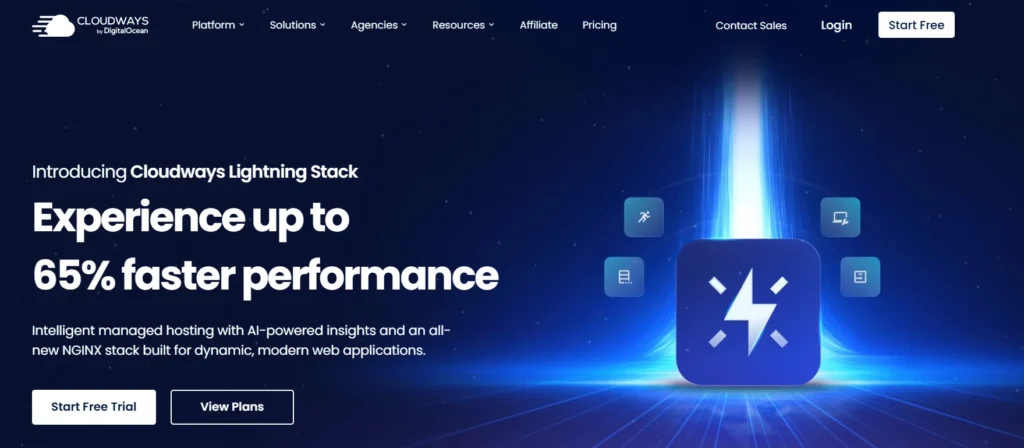
Cloudways is a managed cloud hosting platform. It gives you a simpler dashboard to deploy and manage websites on cloud infrastructure without directly handling every server level task.
With a normal shared host, your website shares a server with many other accounts. You usually have limited control over server resources, caching, PHP settings, and scaling. That is fine for small blogs and simple business websites, but it can become restrictive as traffic grows.
Cloudways gives you dedicated server resources based on the server size you choose. Your RAM, CPU, storage, and bandwidth are assigned to your server. You can launch several WordPress sites or PHP applications on the same server, but they all share the resources you pay for.
This setup is useful because you can start with a smaller server and increase its resources when your website needs more power. You are not locked into a three year hosting contract just to receive a low monthly price.
Cloudways is not a fully hands off managed WordPress service in the same way as Kinsta or WP Engine. You still need to choose your cloud provider, select a server size, set up your application, manage plugins, and monitor resource usage. But it removes much of the difficult infrastructure work.
Cloudways Flexible vs Cloudways Autonomous
Cloudways currently offers two main hosting products. They are designed for different types of users.
Cloudways Flexible
Cloudways Flexible is the traditional Cloudways product. You choose a cloud provider, choose a server size, choose a data center, and deploy your website or application.
It supports WordPress, WooCommerce, Magento, Laravel, and other PHP applications. You can host multiple websites on one server, install applications with a few clicks, create staging sites, clone applications, manage backups, configure PHP settings, use SSH and SFTP access, and scale the server when needed.
This is the better option for agencies, developers, affiliate publishers, and users managing more than one website.
Cloudways Autonomous
Cloudways Autonomous is a more hands off managed WordPress service. It is built for high traffic WordPress, WooCommerce, LMS, booking, and membership websites that need automatic scaling during traffic spikes.
Instead of selecting a cloud server yourself, Cloudways handles the underlying infrastructure. Autonomous includes Kubernetes based autoscaling, load balancing, Cloudflare Enterprise, Object Cache Pro, Redis caching, staging, managed migrations, and security protection.
This product is more expensive than Cloudways Flexible. It is useful for stores and high traffic businesses that cannot risk a website slowing down during a flash sale, product launch, viral campaign, or seasonal rush.
For most affiliate sites, content websites, agencies, and small businesses, Cloudways Flexible is the better value. Autonomous makes more sense when consistent high traffic and automatic scaling are business requirements.
Cloudways Pricing and Plans
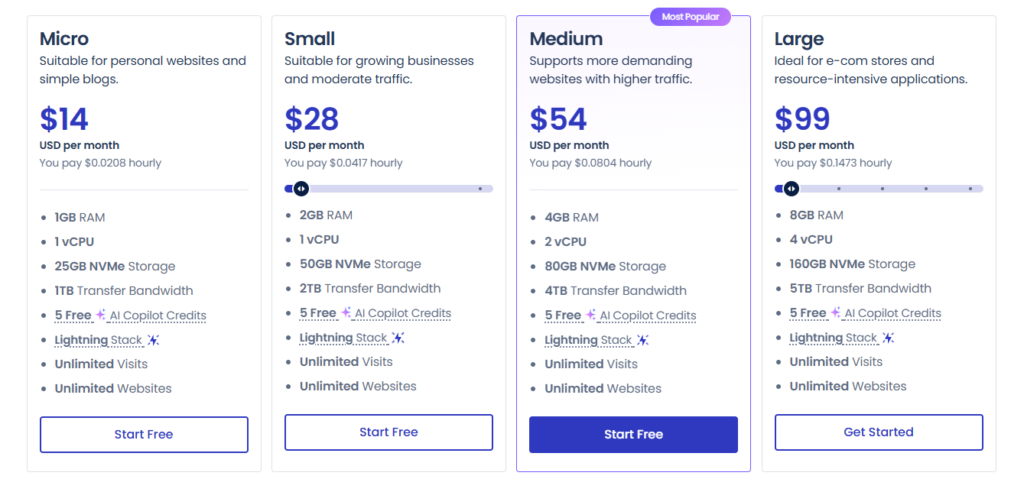
Cloudways Flexible pricing depends on the cloud provider and server size you choose. Unlike standard shared hosting, there is no single Premium or Business plan with one fixed price.
You pay for the cloud server you select. The price is charged hourly and reflected on your monthly invoice. This means you can scale server resources for a busy period without paying for a full year in advance.
| Cloud Provider | Starting Monthly Price | Best For |
|---|---|---|
| DigitalOcean | $11 per month | Bloggers, affiliate sites, small businesses, agencies |
| Vultr | $14 per month | Users wanting more data center options and NVMe based servers |
| Linode | $14 per month | Developers and businesses wanting predictable cloud resources |
| Google Cloud | $37.45 per month | Businesses needing Google Cloud infrastructure |
| AWS | $38.56 per month | Larger projects that need Amazon cloud infrastructure |
DigitalOcean is usually the best starting point for most people because it offers a strong balance of price, resources, and simplicity.
Vultr is worth considering when you want a specific server region or high frequency cloud server. AWS and Google Cloud are more expensive, but they can be useful for larger companies that already use those cloud ecosystems.
Cloudways DigitalOcean Pricing
The table below shows current DigitalOcean server examples listed by Cloudways. These prices are for Cloudways Flexible before taxes and optional add ons.
| Server Size | Monthly Price | RAM | vCPU | Storage | Transfer Bandwidth | Best For |
|---|---|---|---|---|---|---|
| Micro | $11 | 2 GB | 1 | 50 GB | 2 TB | Small blogs, portfolios, basic business websites |
| Medium | $88 | 8 GB | 4 | 160 GB | 5 TB | Busy WordPress sites, agencies, growing stores |
| 8XL | $342 | 128 GB | 24 | 2560 GB | 11 TB | Large stores and resource heavy applications |
The $11 plan is a practical starting point for one small to medium WordPress site. It can also host more than one lightweight website, but you should not overload it with many heavy plugins, WooCommerce stores, page builders, or traffic intensive applications.
For a serious affiliate website, a growing business site, or multiple WordPress sites, a server with 4 GB RAM or more is generally a safer long term choice. It gives caching tools more room to work and helps reduce slowdowns during traffic peaks.
Cloudways Autonomous Pricing
Cloudways Autonomous is priced differently because it includes autoscaling infrastructure and advanced managed WordPress features.
| Autonomous Plan | Monthly Price | Websites | Disk Space | Bandwidth | Best For |
|---|---|---|---|---|---|
| Free Trial | $0 for 3 days | 1 | 20 GB | 150 GB | Testing the platform |
| Growth | $99 per month | 1 | 20 GB | 150 GB | Growing WordPress and WooCommerce sites |
| Scale | $199 per month | 1 | 50 GB | 250 GB | Ecommerce websites with higher demand |
| Plus | $399 per month | 1 | 100 GB | 1000 GB | LMS platforms and larger WooCommerce stores |
Cloudways Autonomous does not use a visitor limit in the same way as many managed WordPress hosts. Instead, it includes bandwidth, disk space, baseline autoscaling servers, and charges for additional usage when your site requires more capacity.
Cloudways Add On Costs
The base server price is not always your complete Cloudways bill. This is an important point because some useful services cost extra.
| Add On | Starting Price | What It Does |
|---|---|---|
| Cloudflare Enterprise | $4.99 per domain monthly | CDN, edge caching, smart routing, image optimization, WAF features |
| Site Manager | $3 per application monthly | Central WordPress management, monitoring, safe updates, visual testing |
| Malware Protection | $4 per application monthly | Automated malware detection and removal |
| Rackspace Email | $1 per mailbox monthly | Professional email hosting |
| Advanced Support | $100 per month | More technical application support and faster response options |
| Automated Backup Storage | $0.033 per GB per server | Offsite backup storage for Flexible servers |
The most useful optional upgrade for many site owners is Cloudflare Enterprise. It can improve global page delivery and add stronger security tools. However, it is not necessary for every new blog or local business site.
The backup fee is also worth understanding. Cloudways lets you choose automatic backup frequency from every hour to every seven days. More frequent backups create more storage use, so active ecommerce sites may pay more than simple websites.
Cloudways Features

Cloudways includes many useful features with its Flexible platform.
| Feature | Cloudways Flexible |
|---|---|
| Multiple applications per server | Yes |
| WordPress and WooCommerce support | Yes |
| Laravel and Magento support | Yes |
| Free Let’s Encrypt SSL | Yes |
| Staging environments | Yes |
| Application cloning | Yes |
| Server cloning | Yes |
| Automated backups | Yes |
| On demand backups | Yes |
| SSH and SFTP access | Yes |
| Git deployment | Yes |
| Managed firewall | Yes |
| WordPress vulnerability scanner | Yes |
| Varnish, Memcached, Redis caching | Yes |
| Object Cache Pro | Included on eligible server sizes |
| CDN | Paid Cloudflare Enterprise add on |
| Email hosting | Paid Rackspace email add on |
| Domain registration | No |
Cloudways Performance and Speed
Cloudways has a strong performance setup because it combines cloud infrastructure with server level optimization.
Its stack includes NGINX, Apache, Varnish, Memcached, Redis, PHP FPM, and a WordPress caching plugin called Breeze. These tools work together to reduce the work your server must do every time someone visits your website.
Varnish helps cache pages. Memcached and Redis can help speed up database requests. NGINX handles web requests efficiently. PHP FPM improves PHP processing. Object Cache Pro is also included on eligible server sizes and can be useful for database heavy WordPress sites.
For WordPress users, this means you do not need to install several overlapping caching plugins. In fact, using too many optimization plugins can create conflicts and make a site slower.
Cloudways also gives you control over your server location. You can choose infrastructure from DigitalOcean, Vultr, Linode, AWS, or Google Cloud, then select a region closer to your main audience.
For example, an India focused website may benefit from a Bangalore or Singapore region. A United States focused website should generally use a United States data center. A global audience can benefit from Cloudflare Enterprise for edge caching and international content delivery.
Your website theme, images, page builder, plugins, database size, and third party scripts still matter. Cloudways gives you a strong foundation, but it cannot fix a poorly optimized website by itself.
Cloudways Security and Backups
Cloudways includes several important security tools. Every server includes firewall protection, IP blocking options, operating system security patches, brute force protection, vulnerability scanning, and free Let’s Encrypt SSL certificates.
The platform also provides Layer 3 and Layer 4 DDoS mitigation through its cloud infrastructure providers. This helps protect against traffic floods intended to overwhelm a website or server.
For WordPress websites, Cloudways includes a vulnerability scanner that checks for known issues in WordPress core, themes, and plugins. This is useful because outdated plugins are one of the most common security risks for WordPress site owners.
Backups are another major strength. You can create on demand backups before making changes, and you can schedule automatic backups from hourly to weekly intervals. This is useful before updating plugins, changing a WordPress theme, editing WooCommerce settings, or installing new code.
Still, backups should not be your only recovery plan. Download a separate copy of important files and databases, especially before major site changes. It gives you another recovery option if anything goes wrong.
Cloudways Dashboard and Ease of Use
Cloudways does not use cPanel. It has its own dashboard for server and application management.
The dashboard lets you launch servers, deploy WordPress, access SFTP credentials, manage domains, install SSL certificates, create backups, monitor RAM and CPU usage, configure PHP settings, manage cron jobs, create staging environments, and deploy code through Git.
It is easier than managing DigitalOcean, AWS, or Google Cloud directly. But it still requires more learning than a basic shared hosting control panel.
A beginner can use Cloudways successfully, especially for WordPress. But they should be comfortable learning a few hosting terms such as server, application, RAM, PHP, staging, backup frequency, DNS, and cache.
For agencies and experienced site owners, the dashboard is a major advantage. You can keep multiple servers, applications, teams, projects, and clients in one account.
Cloudways Support and Migration
Cloudways includes live chat and ticket support around the clock. This is useful for billing questions, server issues, backup problems, migrations, SSL setup, DNS guidance, and platform related issues.
Standard support does not always include deep troubleshooting for third party WordPress plugins, custom themes, or custom code. The Advanced Support add on is designed for users who want more help with plugin issues, performance optimization, and application level concerns.
Cloudways offers free WordPress and WooCommerce migrations through its Cloudways Migrator plugin. It also offers free expert managed migrations for WordPress and WooCommerce sites. Non WordPress migrations can involve additional charges.
This is useful for people moving away from shared hosting. You can create your Cloudways server, migrate the site, test it on a temporary address, update DNS records, and then make the new version live.
Cloudways for WooCommerce and Ecommerce
Cloudways is a good option for WooCommerce because stores often need more server resources than a normal blog.
WooCommerce websites generate dynamic requests through carts, checkouts, inventory changes, customer accounts, payment gateways, coupons, and order data. These pages cannot always be served from cache, so the server needs enough RAM and CPU to handle them.
A small store can start with a DigitalOcean server, but it should not begin on the cheapest option if it has many products, frequent orders, heavy plugins, or traffic from paid ads.
Cloudways Autonomous may be worth considering for stores that face sudden traffic spikes. It includes autoscaling and load balancing, which can help during major promotions, seasonal campaigns, and product launches.
For a normal WooCommerce store with steady traffic, Cloudways Flexible is usually more affordable and gives you more control over the server.
Cloudways Pros and Cons
Cloudways Pros
• Managed cloud hosting without a long term hosting contract
• Pay as you go billing based on server resources
• Choice of DigitalOcean, Vultr, Linode, AWS, and Google Cloud
• Multiple websites and applications can run on one server
• Strong caching tools including Varnish, Memcached, Redis, and Object Cache Pro on eligible servers
• Free SSL certificates and staging environments
• Automated and on demand backups
• Free WordPress and WooCommerce migration options
• Good choice for agencies, developers, affiliate websites, and growing businesses
• Can scale server resources as website demands increase
Cloudways Cons
• More technical than basic shared hosting
• Does not include a free domain name
• Standard email hosting costs extra
• CDN costs extra on Flexible plans
• Backup storage creates an additional charge
• The cheapest server may not be enough for busy WooCommerce stores
• Advanced support is expensive
• Beginners may need time to understand server resources and application settings
Cloudways vs Kinsta vs WP Engine vs Rocket.net
| Provider | Starting Price | Hosting Type | Website Limit | Email Included | Best For |
|---|---|---|---|---|---|
| Cloudways Flexible | $11 per month | Managed cloud hosting | Multiple apps per server | No | Users who want flexibility and lower entry costs |
| Kinsta Single 20GB | $35 per month | Managed WordPress hosting | 1 site | No | Businesses wanting a hands off premium WordPress platform |
| WP Engine Startup | $30 per month | Managed WordPress hosting | 1 site | No | Businesses needing WordPress focused tools and support |
| Rocket.net Starter | $30 per month | Managed WordPress hosting | 1 site | No | Users wanting simple premium WordPress hosting with security tools |
Cloudways is the better choice when you want to manage several websites on one server, choose your cloud provider, use non WordPress PHP applications, and scale resources based on your needs.
Kinsta, WP Engine, and Rocket.net are better choices when you want a more hands off WordPress experience. They are simpler for one important WordPress site, but they cost more and are less flexible for hosting multiple projects.
Who Should Choose Cloudways?
Cloudways is a good fit for affiliate marketers managing several content sites, review websites, comparison websites, and lead generation pages. Instead of buying separate shared hosting accounts, you can host multiple WordPress sites on one properly sized server.
It is also useful for agencies. You can organize client websites into projects, add team members, create staging environments, clone sites, migrate WordPress websites, and scale resources when client traffic grows.
Small businesses can use Cloudways for service sites, ecommerce stores, booking websites, membership websites, and company blogs. The platform is especially useful when a website is important for lead generation or sales.
Developers benefit because Cloudways supports Git deployment, SSH access, PHP version selection, cron jobs, staging, Laravel, Magento, and other PHP applications.
Who Should Avoid Cloudways?
Cloudways may not be the best fit for a person launching a small hobby blog with no traffic and no technical experience. A low cost host such as Hostinger or Bluehost may be easier for a first website.
It may also not be suitable for someone who wants a free domain, free email inboxes, a simple cPanel account, and a fixed yearly hosting bill with no resource decisions.
Users who only have one business critical WordPress website and want the most hands off setup may prefer Kinsta, WP Engine, or Rocket.net. Those providers cost more, but they remove some of the server choices that Cloudways still leaves to you.
Cloudways Review FAQs
Is Cloudways good for WordPress?
Yes. Cloudways is a strong host for WordPress because it includes server level caching, SSL, staging, backups, security tools, free migration options, and the ability to choose your server provider and location.
Is Cloudways better than shared hosting?
For growing websites, usually yes. Cloudways gives you dedicated server resources, stronger caching tools, greater control, and easier scaling. For a new personal blog, shared hosting can still be cheaper and easier.
Does Cloudways include email hosting?
No. Cloudways does not include free business email mailboxes with its hosting plans. Rackspace Email is available as an add on from $1 per mailbox monthly.
Does Cloudways include a free domain?
No. You need to buy a domain from a separate registrar and point its DNS records to your Cloudways application.
Is Cloudways good for WooCommerce?
Yes. Cloudways can be a good choice for WooCommerce because it offers dedicated resources, Redis, Object Cache Pro on eligible plans, staging, backups, and scalable servers. A growing store should choose enough RAM and CPU instead of relying on the cheapest server.
Does Cloudways have a money back guarantee?
Cloudways offers a three day trial without requiring a credit card for eligible plans. Its Flexible platform uses hourly billing, so you pay only for the time and resources you use after activating a paid server.
Is Cloudways Worth It?
Cloudways is worth it for people who have outgrown cheap shared hosting but do not want to manage a raw cloud server alone.
Its biggest advantage is flexibility. You can choose your cloud provider, select server resources, host multiple applications, scale your server, use professional caching tools, create staging sites, and pay monthly without a long term contract.
For most people, Cloudways Flexible with DigitalOcean is the best place to start. It offers a low entry price, solid resources, useful WordPress tools, and room to scale later.
Cloudways is not the easiest host for complete beginners, and the extra costs for backups, email, CDN, and advanced support should be considered. But for affiliate publishers, agencies, ecommerce stores, developers, and businesses that need more control over website performance, it remains one of the strongest managed cloud hosting options available.