
InMotion Hosting is a well known web hosting provider that targets small businesses, bloggers, affiliate marketers, agencies, developers, and growing WordPress websites. It offers shared hosting, WordPress hosting, managed WordPress servers, VPS hosting, dedicated servers, and reseller plans.
For most people, InMotion Hosting is best known for its shared hosting plans. These plans include cPanel, free SSL, email accounts, a free domain credit on eligible terms, migration help, NVMe storage, security features, and support from real people around the clock.
Its plans are not the cheapest in the market. Hostinger and DreamHost can cost less over the first term or at renewal. Still, InMotion Hosting gives you more storage than many competitors, strong tools for developers, a 90 day money back guarantee, and a better upgrade path when your website starts growing.
The important part is choosing the right plan. Launch is suitable for a small website or two. Power is the best choice for most users because it supports 10 websites, includes 200 GB NVMe storage, allows stronger performance features, and includes phone support. Pro is aimed at agencies, larger publishers, and users managing many sites from one account.
This InMotion Hosting review covers pricing, shared hosting features, WordPress tools, speed, backups, security, email, support, and the main reasons you may choose another provider.
InMotion Hosting Overview

InMotion Hosting is a good option for users who want traditional cPanel hosting with more storage and flexibility than many entry level hosting plans.
It is especially useful for affiliate marketers, agencies, small businesses, developers, WordPress users, and people who want to host several websites under one account.
| Category | InMotion Hosting Details |
|---|---|
| Best for | Small businesses, bloggers, affiliate sites, agencies, WordPress users, and developers |
| Starting price | $4.99 per month on a 36 month term |
| Best value plan | Power |
| Hosting type | Shared hosting, WordPress hosting, managed WordPress, VPS, dedicated servers, reseller hosting |
| Control panel | cPanel |
| Storage | 100 GB to 300 GB NVMe storage |
| Websites | 2 to 40 websites |
| Bandwidth | Unmetered |
| Free domain | Included for the first year on eligible 12, 24, and 36 month terms |
| Email hosting | Included with cPanel email accounts |
| Backups | Backup Manager available as an add on on standard shared hosting |
| Support | 24 hour chat and ticket support, plus phone support on Power and Pro |
| Refund period | 90 day money back guarantee on eligible plans |
InMotion Hosting Pricing and Plans
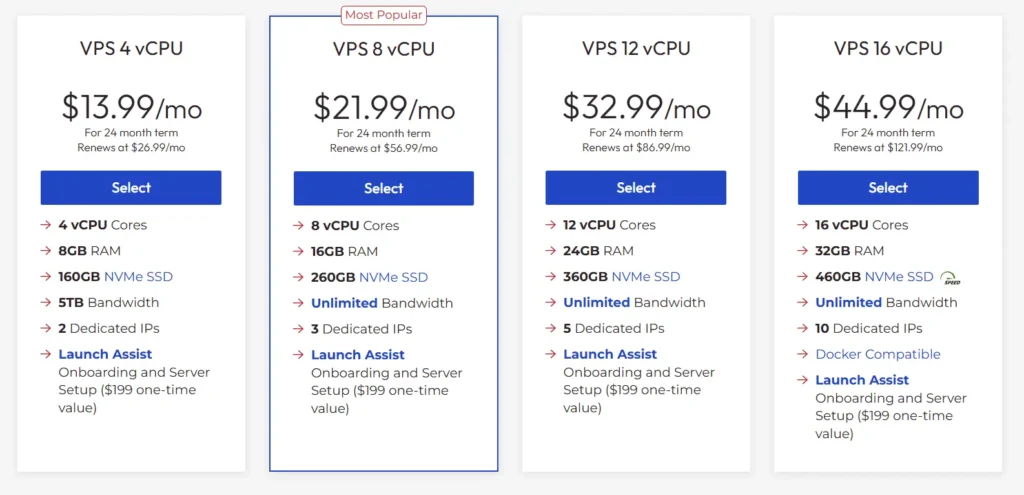
InMotion Hosting has three main shared hosting plans: Launch, Power, and Pro.
The lowest advertised prices require a prepaid term. The table below uses the current 36 month rates. You pay the full first term at checkout, not month by month.
| Plan | Intro Price Per Month | First Term Cost for 36 Months | Renewal Price Per Month | Websites | NVMe Storage | Suggested Monthly Visitors | Best For |
|---|---|---|---|---|---|---|---|
| Launch | $4.99 | $179.64 | $13.99 | 2 | 100 GB | Around 50,000 | Personal sites, blogs, and small businesses |
| Power | $5.99 | $215.64 | $17.99 | 10 | 200 GB | Around 300,000 | Growing sites, affiliate projects, and small businesses |
| Pro | $10.99 | $395.64 | $24.99 | 40 | 300 GB | Around 500,000 | Agencies, publishers, and larger site portfolios |
The visitor figures are general guidance, not guaranteed traffic limits. A lightweight blog can handle more visitors than a WooCommerce store with customer accounts, frequent cart activity, large images, and many plugins.
InMotion Hosting also has annual and monthly billing. Annual introductory prices may be slightly different, while monthly billing costs more and has a higher renewal rate.
InMotion Hosting Launch Plan
Launch is the entry level shared hosting plan. It supports two websites and includes 100 GB NVMe storage, unmetered bandwidth, unlimited cPanel email addresses, unlimited databases, free SSL, security tools, and a free domain credit on eligible terms.
This is a good plan for someone running a personal blog, portfolio, local business website, or two simple WordPress sites.
The 100 GB storage allowance is generous for an entry plan. Many competitors offer 10 GB to 25 GB at a similar starting price. It gives you enough room for a normal WordPress media library, email storage, plugins, site files, and databases.
The main limitation is support. Launch includes live chat and ticket support, but not phone support. It also does not include advanced caching or the stronger ecommerce tools available on Power and Pro.
InMotion Hosting Power Plan
Power is the best InMotion Hosting plan for most users. It supports up to 10 websites and includes 200 GB NVMe storage, unlimited bandwidth, unlimited email accounts, unlimited databases, advanced caching, ecommerce readiness, and phone support.
This is the plan that makes sense for affiliate marketers, bloggers with several websites, freelancers, small agencies, and businesses with a main website plus landing pages or smaller projects.
The storage upgrade is significant. You get 200 GB, which is enough for multiple content sites, business websites, email accounts, WordPress files, media libraries, and databases.
Power also includes stronger UltraStack performance tools. InMotion Hosting labels this tier as offering up to 12 times UltraStack performance compared with its baseline tier. Treat this as a product level comparison rather than a guaranteed loading time improvement for every website. Your theme, plugins, images, cache settings, and third party scripts still affect real performance.
Power includes phone, chat, and ticket support. That is important for users who prefer speaking to a support agent when they face an urgent hosting or domain problem.
InMotion Hosting Pro Plan
Pro is the largest shared hosting plan. It supports up to 40 websites and includes 300 GB NVMe storage, two vCPU cores, 4 GB RAM, a dedicated IP address, advanced caching, agency features, ecommerce support, and phone support.
This plan is built for agencies, publishers, developers, and users managing a larger portfolio of websites.
A useful agency feature is the ability to manage up to four client cPanel accounts through Web Hosting Manager access. This lets you separate some client websites instead of putting every project into one shared cPanel account.
Pro is not automatically the right choice for every business. A simple company website will not need 40 websites or 300 GB storage. Power is usually the better value unless you already have several active sites or need the included dedicated IP and agency tools.
InMotion Hosting Features Compared
| Feature | Launch | Power | Pro |
|---|---|---|---|
| Websites | 2 | 10 | 40 |
| NVMe storage | 100 GB | 200 GB | 300 GB |
| Bandwidth | Unmetered | Unmetered | Unmetered |
| Suggested traffic | Around 50,000 visits | Around 300,000 visits | Around 500,000 visits |
| Free SSL | Yes | Yes | Yes |
| Free domain credit | Yes on eligible terms | Yes on eligible terms | Yes on eligible terms |
| cPanel email accounts | Unlimited | Unlimited | Unlimited |
| Email storage per inbox | 5 GB | 10 GB | 20 GB |
| Free migration | Yes | Yes | Yes |
| Phone support | No | Yes | Yes |
| Advanced caching | No | Yes | Yes |
| Ecommerce ready tools | No | Yes | Yes |
| Dedicated IP | Available as an add on | Available as an add on | Included |
| vCPU and RAM allocation | Not published separately | Not published separately | 2 vCPU and 4 GB RAM |
| Agency tools | No | No | Included |
InMotion Hosting Performance and Speed
InMotion Hosting uses NVMe storage across its shared hosting plans. NVMe storage is faster than traditional hard drives and can improve file access, database processing, WordPress administration, and general website responsiveness.
The company uses its own performance configuration called UltraStack. The plans scale from a basic UltraStack tier on Launch to higher performance tiers on Power and Pro.
Power includes advanced caching and is better suited to websites using WooCommerce, larger WordPress setups, or several active sites. Pro includes more dedicated resources, such as two vCPU cores and 4 GB RAM, which can help when several websites receive traffic at the same time.
Shared hosting still has limits. Even if bandwidth is described as unmetered, CPU, memory, and server activity are not unlimited. A website with too many plugins, heavy page builders, oversized images, frequent database requests, or bot traffic can use resources quickly.
For the best performance, use a lightweight WordPress theme, optimize images before uploading, remove unused plugins, limit unnecessary scripts, and configure caching properly.
Data Centers and Server Locations
InMotion Hosting lists data center locations in Los Angeles, Ashburn in Virginia, and Amsterdam. Its public data center page also lists Singapore as coming soon, so do not assume an Asia location is available until you see it as an option during checkout.
Choose a location close to your main audience when possible. A United States focused business can use Los Angeles or Ashburn. A European website can consider Amsterdam.
For an India focused audience, a CDN is especially useful when the closest active hosting location is outside India. A CDN can deliver cached images, scripts, and other site files from locations closer to your visitors.
InMotion Hosting WordPress Features
InMotion Hosting works well with WordPress. You can install WordPress through Softaculous, manage your site through cPanel, access databases through phpMyAdmin, create email accounts, activate SSL, and use SSH or SFTP for file access.
The company also supports modern web development tools, including Git, Python, Ruby, Node.js, PHP, MySQL, PostgreSQL, and Laravel. This makes InMotion Hosting more flexible than some beginner focused shared hosts that only target WordPress users.
Standard shared hosting is good for regular WordPress websites. However, InMotion Hosting also offers separate Hosting for WordPress plans for users who want WordPress preinstalled, automatic offsite backups, staging environments, automatic plugin updates, advanced caching, and Cloudflare integration.
| WordPress Plan | Starting Price | Renewal Price | Websites | NVMe Storage | Suggested Monthly Visitors |
|---|---|---|---|---|---|
| WP Launch | $5.49 per month | $14.49 per month | 2 | 100 GB | Around 170,000 |
| WP Power | $6.49 per month | $18.49 per month | 10 | 200 GB | Around 320,000 |
| WP Pro | $11.49 per month | $25.49 per month | 40 | 300 GB | Around 520,000 |
The WordPress plans are worth considering if WordPress is your main platform and you want automatic offsite backups and staging included from the start.
For a basic blog or brochure website, regular shared hosting is enough. For an active affiliate site, WooCommerce store, membership site, or business website that changes often, the WordPress hosting plans are the safer choice.
Backups and Restore Options
Backups are the main area where you need to read the plan details carefully.
Standard InMotion Hosting shared plans list Backup Manager as available. That means you should not assume automated offsite backups are included in the base shared hosting price.
This is a major difference compared with providers such as DreamHost, SiteGround, Kinsta, and WP Engine, which include automated backups directly in many plans.
The good news is that InMotion Hosting offers Safe Application Roll Back and backup related tools. You can also add Backup Manager or use a WordPress backup plugin to store copies of your site with Google Drive, Dropbox, Amazon S3, or another provider.
For any serious website, keep an independent backup. Do this before major WordPress updates, theme changes, plugin installs, checkout edits, or custom code work.
The separate Hosting for WordPress plans include automatic offsite backups, which is one reason they may be worth the extra cost for business critical sites.
Security Features
All shared hosting plans include free SSL certificates, malware protection, DDoS protection, a web application firewall, SSH access, and spam filtering through MailChannels.
SSL is essential because it protects data between your website and visitors. It also allows your site to use HTTPS, which is important for browser trust, contact forms, login pages, ecommerce stores, and search visibility.
The web application firewall helps filter common malicious requests before they reach your website. DDoS protection helps reduce the impact of traffic floods intended to overload a server.
These tools are useful, but your own website habits still matter. Keep WordPress updated, remove inactive plugins, use strong passwords, avoid pirated themes, and give administrator access only to people who need it.
Domains and Email Hosting
InMotion Hosting includes a free domain credit with 12, 24, and 36 month shared hosting terms. You can use it to register or transfer an eligible non premium .com, .org, .net, .info, or .biz domain.
The domain is free for the first year only. After that, it renews at the regular domain price.
There is also an important refund condition. Domain registration fees are nonrefundable. If you cancel the hosting plan during the money back period, the regular price of the domain can be deducted from your hosting refund.
Email hosting is included through cPanel. Launch includes 5 GB of storage per inbox, Power includes 10 GB, and Pro includes 20 GB. This is useful for businesses that want professional email addresses such as hello@yourdomain.com or support@yourdomain.com.
InMotion Hosting also promotes a Professional Email product with a 30 day trial. That is separate from the included cPanel email service and may be useful for businesses wanting a more advanced email setup.
Migration and Support
InMotion Hosting includes website migration help with its shared hosting plans. The migration is free when you provide one full cPanel or WordPress backup.
This is a useful feature for people moving away from another shared host. You provide the backup, submit a transfer request, and the migration team handles the move.
Support is available around the clock through chat and ticket support. Power and Pro users also receive phone support.
The 90 day money back guarantee is one of InMotion Hosting’s strongest selling points. Most major hosting companies provide 30 days. A longer period gives you more time to test performance, support, email, WordPress compatibility, and the control panel.
Remember that domain costs and optional add ons may not be refundable.
InMotion Hosting Pros and Cons
Pros
• Large NVMe storage allowances on every shared hosting plan
• Free domain credit on eligible annual and longer terms
• Free SSL certificates and cPanel email accounts
• cPanel is easy to use and familiar to most hosting users
• Free migration support with a full cPanel or WordPress backup
• Power includes phone support, advanced caching, and ecommerce tools
• Pro includes dedicated IP, agency tools, 2 vCPU cores, and 4 GB RAM
• Good support for WordPress, Laravel, Node.js, Git, Ruby, MySQL, and PostgreSQL
• 90 day money back guarantee
• Separate WordPress hosting plans include automatic offsite backups and staging
Cons
• Standard shared hosting does not clearly include automated offsite backups by default
• Renewal prices are much higher than introductory prices
• Launch does not include phone support or advanced caching
• Best promotional rates require prepaid terms
• Shared hosting may not suit large WooCommerce stores or high traffic membership platforms
• Data center availability in Asia should be confirmed before purchase
• Domain registration fees are not refundable
InMotion Hosting vs Similar Hosting Providers
| Provider | Comparable Plan | Intro Price | Renewal Price | Websites | Storage | Backups |
|---|---|---|---|---|---|---|
| InMotion Hosting | Power | $5.99 per month | $17.99 per month | 10 | 200 GB NVMe | Backup Manager available |
| Hostinger | Business | $3.99 per month | $16.99 per month | 50 | 50 GB NVMe | Daily and on demand |
| DreamHost | Growth | $3.99 per month | $12.99 per month | 50 | 50 GB NVMe | Daily automated |
| Bluehost | Business | $6.99 per month | $13.99 per month | 50 | 50 GB NVMe | Automated backups |
| SiteGround | GrowBig | $4.99 per month | $29.99 per month | Unlimited | 50 GB | Daily and on demand |
These plans are not identical because the promotional prices use different contract lengths. Always compare the total amount due at checkout, the renewal rate, storage, backup policy, and support type before buying.
InMotion Hosting Power gives you substantially more storage than many competitors. It is a good pick for users hosting several content sites, local business websites, and client projects.
Hostinger Business is better for users who want a lower starting price, daily and on demand backups, and up to 50 websites.
DreamHost Growth has a lower renewal price and includes daily automated backups, making it a strong option for users who care about long term cost.
SiteGround GrowBig is better for users who want staging, hands on WordPress tools, and daily backups, but its renewal rate is significantly higher.
Who Should Choose InMotion Hosting?
InMotion Hosting is a strong choice for affiliate marketers who plan to run review sites, comparison websites, niche blogs, content websites, and lead generation pages.
The Power plan is especially useful because it supports up to 10 websites, includes 200 GB NVMe storage, and provides advanced caching and phone support.
Small businesses can use InMotion Hosting for company websites, local SEO pages, professional email, WordPress blogs, booking websites, and basic ecommerce stores.
Freelancers and agencies can use Pro for client sites. The dedicated IP, extra server resources, 40 website allowance, and client management tools make it more practical than an entry shared hosting package.
Developers may also prefer InMotion Hosting because it supports SSH, Git, Node.js, Ruby, Python, PostgreSQL, and Laravel alongside WordPress.
Who Should Avoid InMotion Hosting?
InMotion Hosting may not be the best choice if you need automatic daily backups included with your basic shared plan. In that case, DreamHost Growth, Hostinger Business, or SiteGround GrowBig may be easier choices.
It may also not be ideal for a beginner who only needs one very small website and wants the lowest possible price. Hostinger Premium or DreamHost Launch can be cheaper.
Large ecommerce stores, membership platforms, busy booking websites, and high traffic publishers may outgrow shared hosting. InMotion Hosting has VPS and managed WordPress options, but a platform such as Kinsta, WP Engine, Cloudways, or a managed VPS may be a better fit from the start.
InMotion Hosting Review FAQs
Is InMotion Hosting good for WordPress?
Yes. InMotion Hosting is good for WordPress users because it includes cPanel, free SSL, migration help, email hosting, NVMe storage, one click WordPress installation, SSH access, and WordPress specific hosting plans.
Does InMotion Hosting include a free domain?
Yes. A free domain credit is included with eligible 12, 24, and 36 month plans. It applies to selected non premium domain extensions and covers the first year only.
Does InMotion Hosting include free backups?
Standard shared hosting lists Backup Manager as available, so do not assume automated offsite backups are included. InMotion Hosting for WordPress includes automatic offsite backups.
Is InMotion Hosting Power worth it?
Yes. Power is the best plan for most users because it supports 10 websites, includes 200 GB NVMe storage, advanced caching, ecommerce tools, and phone support.
Does InMotion Hosting offer phone support?
Power and Pro include phone, chat, and ticket support. Launch includes chat and ticket support.
Does InMotion Hosting offer a refund?
Eligible shared hosting plans have a 90 day money back guarantee. Domain registration and certain add ons are excluded from refunds.
Is InMotion Hosting Worth It?
InMotion Hosting is worth considering when you want more storage, cPanel access, developer tools, email hosting, and support options than many basic shared hosting providers offer.
The Power plan is the best choice for most people. It gives you room for 10 websites, 200 GB NVMe storage, advanced caching, ecommerce readiness, and phone support without the cost of the Pro plan.
The main point to remember is backups. Standard shared hosting does not clearly include automatic offsite backups in the base plan. For a business or revenue generating site, add a backup solution or choose InMotion Hosting for WordPress, which includes automated offsite backups and staging tools.
For bloggers, affiliate marketers, small businesses, agencies, and developers who want powerful traditional hosting with a long refund period, InMotion Hosting is a solid choice.